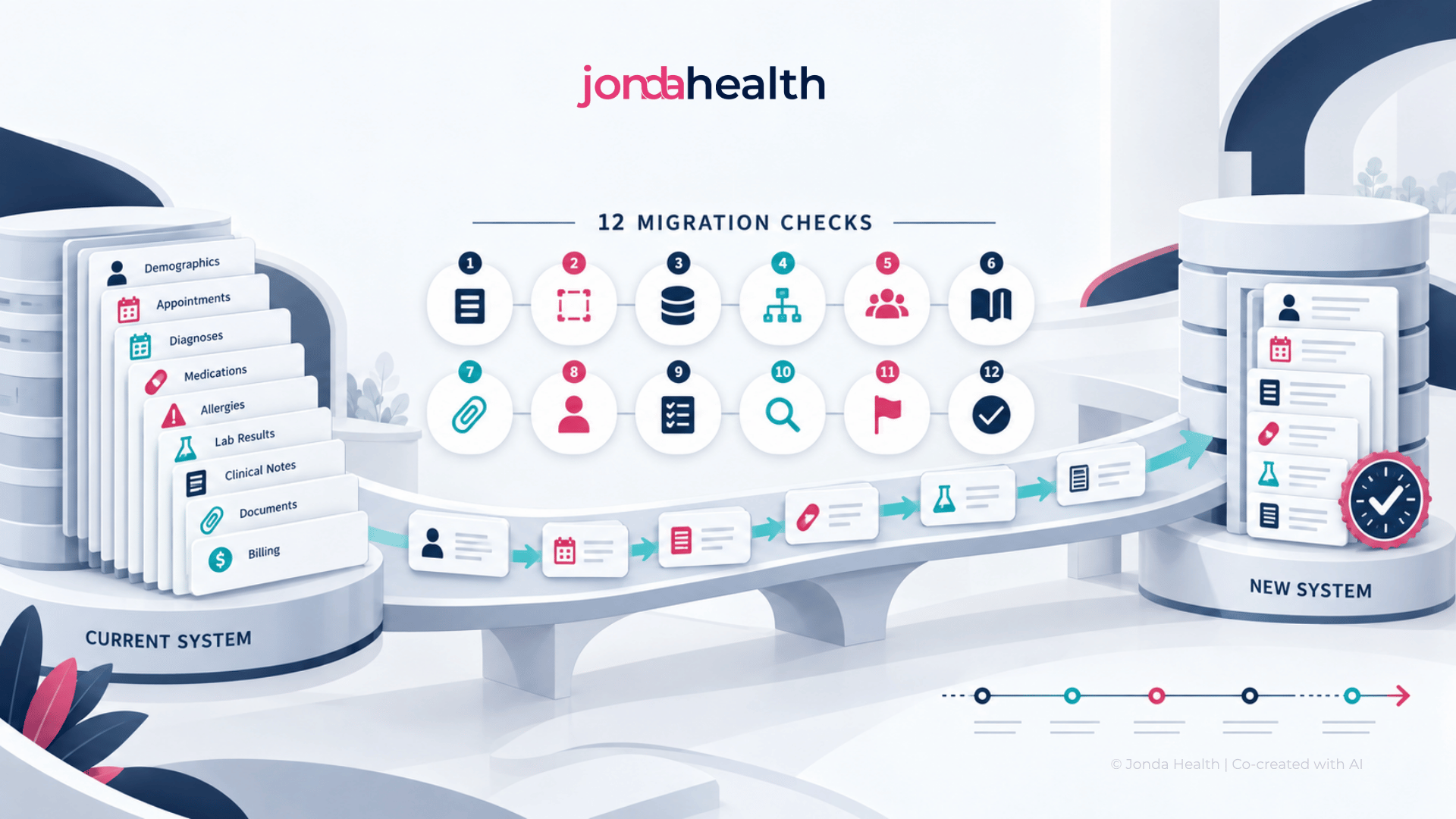
Changing your clinic management system or EHR? This guide sets out 12 things to check, from your right to your own data to clinical safety at cutover, so that your patient records arrive intact.

Changing your clinic management system or EHR is one of the larger decisions a practice makes. The new system is usually chosen with care, through demonstrations, references and negotiation. The move of the data tends to receive much less attention, and it is often summed up in a single line of the proposal that reads "data migration included".
That line deserves a closer look, because your patient records are the most valuable thing your practice holds. They carry years of clinical history, they are what your clinicians rely on in every consultation, and you have legal obligations to keep them. A migration that goes well is invisible. A migration that goes badly shows up as a missing allergy, a patient who appears twice, or ten years of laboratory results that have become a folder of files nobody can search.
This guide sets out twelve things to check, in the order you will meet them. It is written for clinic owners, practice managers and IT leads, and you do not need a technical background to use it. At the end we explain how Jonda Health supports migrations, for those who would like help.

Read your contract with your current vendor before you tell them you are leaving. Look for what it says about exporting your data: whether you are entitled to a full export, in what format, how long it takes, what it costs, and how long you keep access after the contract ends. Some vendors are helpful. Others provide only a partial export, charge a substantial fee, or supply a format that is hard for anyone else to read. If the terms are unclear, ask for them in writing now, while you are still a paying customer.
List every kind of information in your current system. This usually includes patient demographics, consultation notes, diagnoses, medications and prescriptions, allergies, immunisations, laboratory results, scanned documents and letters, images, appointments, recalls and reminders, and billing and account balances. For each one, note roughly how much there is and how many years it covers. This inventory becomes the basis for every conversation that follows, and it prevents the common situation in which something important is remembered only after go-live.
It is not always necessary to move everything into the new system. Moving more costs more and takes longer, and old data of poor quality can clutter a new system. On the other hand, you have legal obligations to retain records for a set period, and clinicians need history to practise safely. A sensible approach is to sort each kind of data into one of three groups.
Agree these decisions with your clinicians, and check your retention obligations before anything is placed in the third group.
Nobody can estimate a migration accurately without seeing the data. Ask your current vendor for a sample export as early as you can, ideally before you sign with the new one. It will show what format the data arrives in, whether the fields are labelled clearly, how consistently they were filled in and whether anything is missing. A short data assessment at this stage is the most reliable way to obtain a realistic quote and timeline, and it often reveals issues that would otherwise have surfaced in the middle of the project.
This is easy to overlook, and we have seen it cause real difficulty. Systems differ in what they are able to store. Your old system may hold scanned documents, structured laboratory results, recalls or account balances in ways the new system does not support, or supports differently. Ask the new vendor for a list of the data fields their system accepts, and compare it with your inventory line by line. For anything without a clear destination, agree in advance what will happen to it. Then look at how coded information will be carried across, such as diagnoses, medication lists and test names, because the two systems will rarely use the same codes, and a plan is needed for translating one into the other.
Many practices hold a large part of their clinical history as attachments: laboratory reports received as PDFs, scanned referral letters, specialist reports and consent forms. There are two questions to ask. The first is whether every document will arrive attached to the right patient, with its date and description intact. The second is whether it is enough for those documents to remain as files, or whether you would like the information inside them, such as years of laboratory results, to become structured data that your new system can chart and search. The second option requires additional work. A migration is the natural moment to consider it, because the documents are being handled anyway.
Almost every system that has been in use for some years contains patients who were registered twice, with slightly different spellings, an old address or a missing identity number. Migrating those duplicates carries the problem into the new system, where a clinician may open one record and miss the allergy recorded in the other. Ask how duplicates will be identified, who decides which records should be merged, and whether that clean-up takes place before, during or after the migration. Merging records is a clinical decision as well as a technical one, so someone from the practice needs to be involved.
A migration should be rehearsed before it is performed. In a trial migration, a copy of your data is moved into a test version of the new system, and the result is checked in two ways. The first is by numbers: the count of patients, consultations, prescriptions and documents in the old system should match the new one, and any difference should be explained. The second is by eye. Ask each clinician to choose ten patients they know well, including some with long and complicated histories, and compare the old record with the new one side by side. Agree in advance what level of accuracy is acceptable, and do not set a go-live date until the trial has met it.
The cutover is the moment you stop using the old system and start using the new one. Decide when it will happen, and a quiet period such as a weekend is usual. Decide how long the practice will be without a system and how consultations will be recorded during that time. Plan how the data entered between the trial export and the final one will be brought across. Agree what will happen if something goes wrong, including the point at which you would return to the old system. A written cutover plan, shared with every member of staff, removes a great deal of anxiety from the day.
Some information carries more clinical risk than the rest. Allergies and adverse reactions, current medications, active diagnoses, alerts, results awaiting review and outstanding recalls are the items where an error could directly harm a patient. For these, a sample check is not sufficient. Ask how each will be verified in full, and consider asking clinicians to reconfirm allergies and current medications with every patient at their first visit after go-live. It takes a moment in each consultation, and it is the most reliable safety net there is.
During a migration, a complete copy of your patient records leaves its usual home, and you remain responsible for it. Ask who will handle the data and under what agreement, where it will be processed and whether that satisfies your legal obligations, how it will be transferred and whether it is encrypted in transit and at rest, and when and how every working copy will be deleted once the migration is complete. Ask for written confirmation of that deletion. Anyone who handles your data should be able to show recognised security credentials, such as ISO 27001 certification.
However careful the migration, there will be occasions in the following months when someone needs to look at the old system, whether to settle a query, respond to a legal request or find something that was archived and not migrated. Arrange read-only access to the old system, or a searchable archive, for at least the first year, and for as long as your retention obligations require. Confirm what this will cost before you cancel the old contract.
It is also worth adding up the full cost of the migration, which goes beyond the fee in the proposal. It includes any export fee charged by the old vendor, the migration work itself, optional items such as structuring documents or harmonising codes, staff time spent on validation and clean-up, overlapping licences while both systems are running, and the archive afterwards. Seeing the whole figure makes it easier to compare proposals fairly, and to decide which optional items are worth including.
Jonda Health provides clinical data migration for clinics, clinic groups and the system vendors who serve them. We move patient records from one clinical management system or EHR to another, and we work either directly with a practice or alongside the vendor of the new system.
Every engagement begins with a data assessment. We look at a sample of your actual data, confirm what can be moved and where it will go in the new system, and give you a realistic scope and timeline before any commitment is made. The migration itself follows the approach described in this guide, including a trial run, reconciliation and clinician checks before cutover.
Two optional additions are available for practices that would like to arrive in the new system with better data than they left with. The first is document structuring, in which the laboratory reports, letters and scans attached to your records are turned into structured data that the new system can chart and search. The second is harmonisation, in which the different names and codes used for the same tests, diagnoses and medications over the years are brought to a single consistent standard. Both are carried out by JondaX, our health data transformation engine, which works across more than ten languages and has processed more than 500,000 files and more than 26 million data points, with clinical review and quality assurance by Jonda Health's own team.
Jonda Health is ISO 27001 certified, and our work is designed to comply with HIPAA, GDPR and PDPA.
If a change of system is on your horizon, even at an early stage, we would be glad to talk it through with you. Get in touch at hello@jonda.health.
It is the process of moving patient records and practice data from one clinical management system or EHR to another, so that clinicians can continue to work with the full history after the change.
It depends on the size of the practice, the quality of the data and how much help the old vendor provides. A small clinic with a clean export may take a few weeks. A larger group with several sites, many documents and years of history should allow a few months, including the trial migration and the checks.
No. Many practices migrate active patients and recent history into the new system and keep older records in a searchable archive. You must still meet your legal retention obligations, so check those before leaving anything behind.
The most serious are safety-critical information going missing or being attached to the wrong patient (allergies, current medications and pending results in particular), duplicate patient records, documents that lose their link to the patient, and discovering after go-live that the new system had no place for something you needed.
Yes. This is an additional step, usually called document structuring, in which the results inside those files are extracted into structured data. A migration is a good moment to do it, because the documents are being handled anyway.
Jonda Health provides clinical data migration for clinics, clinic groups and system vendors, beginning with a data assessment, and offers optional document structuring and harmonisation through JondaX, its health data transformation engine.
Suhina Singh is the founder and CEO of Jonda Health, a Singapore-based health data infrastructure company. A physician by training, she works with health systems across Asia-Pacific to harmonise, de-identify and standardise clinical data so it can be trusted and used. Jonda Health is ISO 27001 certified.