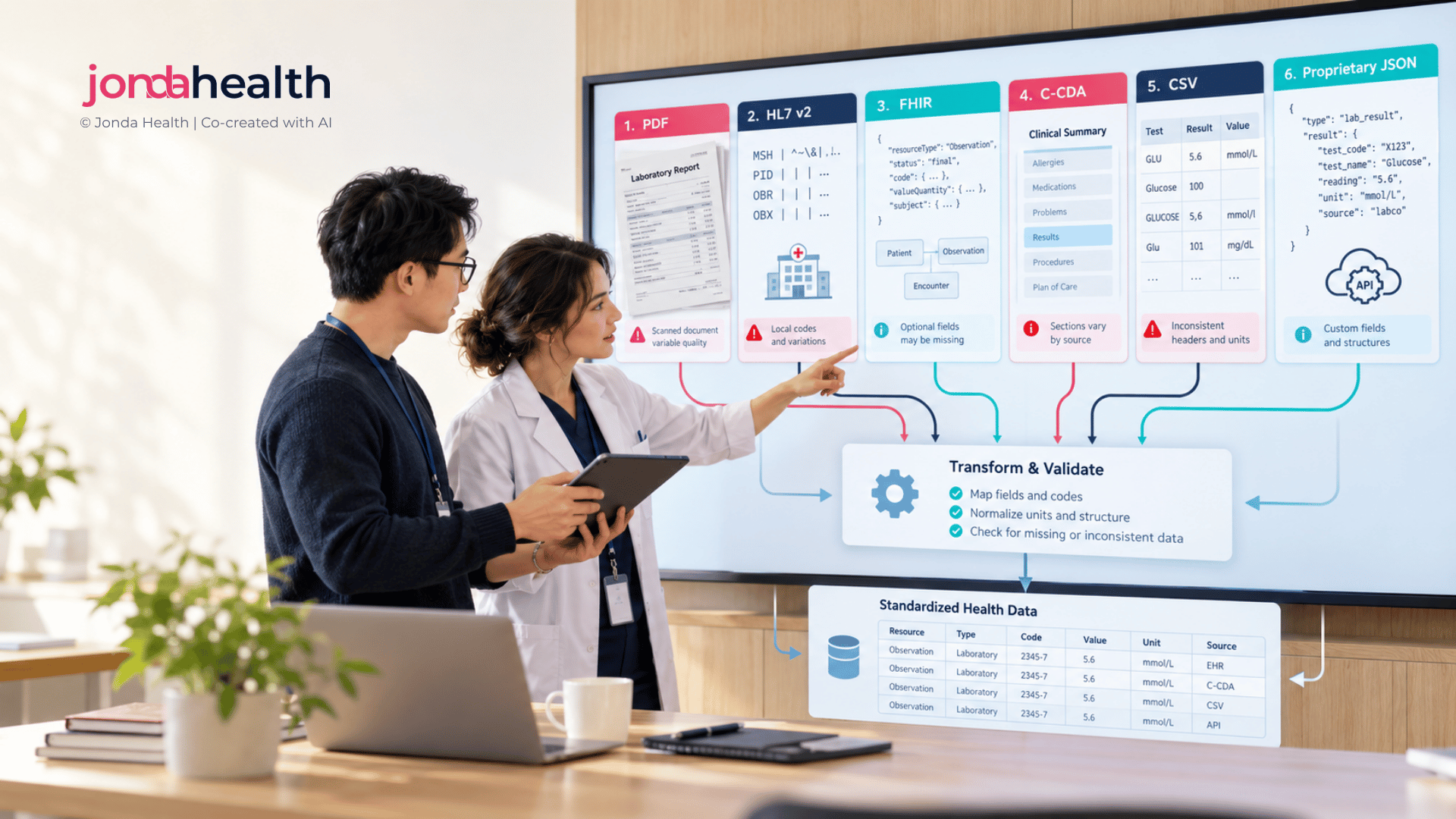
Integration plans usually assume clean, standard messages. Real projects receive a mix of messages, documents, spreadsheets and photos. Here is how to recognise each one, what trips teams up, and what to ask before you build.

When a partner says they will "send the data", that sentence can mean almost anything. It might be a well-formed standards message from a laboratory system, a spreadsheet exported by someone in the IT team, or a folder of scanned reports. Each of these needs a different approach, a different amount of effort and a different set of questions before you write any code.
This guide is about recognition rather than conversion. For each format we show what it looks like, where you are likely to meet it, what tends to go wrong, and what to ask the sender. It builds on the first two guides in this series, which covered the lessons teams learn on their first health data integration and the context that changes what a lab value means.
Most real projects span several points on this line at once, often from the same partner.
Health Level Seven (HL7) Version 2 is the messaging standard that most laboratory, hospital and radiology systems have used for decades, and it remains the most common way results move between systems today. A message is plain text, one segment per line, with fields separated by the pipe character. A results message typically contains a header (MSH), patient details (PID), the order (OBR) and one observation segment (OBX) per result.
A simplified results message (synthetic data)
MSH|^~\&|LIS|SAMPLELAB|APP|CLINIC|20260915083000||ORU^R01|MSG0001|P|2.5.1
PID|1||100234^^^CLINIC^MR||SAMPLE^PATIENT||19710304|F
OBR|1||LAB-88213|GLU^Glucose, fasting^L|||20260914073000
OBX|1|NM|GLU^Glucose, fasting^L||5.4|mmol/L|3.9-5.5|N|||F
The observation segment, field by field. The standard defines what each field should hold1; sites decide how they actually use it.
Fast Healthcare Interoperability Resources (FHIR) is the modern standard, built on web conventions, with data arriving as JSON or XML through a web API. A lab result is usually an Observation resource, often grouped under a DiagnosticReport and delivered together in a Bundle.
A trimmed Observation
{
  "resourceType": "Observation",
  "status": "final",
  "code": { "text": "Glucose, fasting" },
  "effectiveDateTime": "2026-09-14T07:30:00+08:00",
  "valueQuantity": { "value": 5.4, "unit": "mmol/L" }
}
FHIR is a major step forward, but "we support FHIR" is the start of a conversation rather than the end of one. Several versions are in use, with R4 the most widely deployed2, and resources change between versions. FHIR is also designed to be adapted through profiles, so national and vendor implementations differ in which fields are required, which code systems are used and which extensions are added3.
The HL7 Clinical Document Architecture (CDA) is an XML format for complete clinical documents such as discharge summaries, referral letters and continuity of care records. It is common in hospital-to-hospital exchange and in national record systems. A CDA document has two layers: a human-readable narrative, and optional coded entries that software can process. The standard treats the narrative as the clinical content that was signed off4.
Two layers in one section
<section>
  <title>Results</title>
  <!-- what a person reads -->
  <text>Fasting glucose 5.4 mmol/L (14 Sep 2026)</text>
  <!-- what software reads -->
  <entry> ... coded observation ... </entry>
</section>
The trap is that the two layers are produced separately and do not always agree. Some documents carry rich narrative with no coded entries at all, which leaves you extracting data from text inside XML.
Almost every data migration, research extract and bulk handover involves a spreadsheet at some point. CSV files look simple and are easy to read, which is exactly what makes them risky: they carry no built-in description of what each column means.
Two rows, same patient, same test
patient_id,test,result,date
100234,HB,13.2,03/04/2026
100234,Hb,132,2026-04-10
Both rows are haemoglobin. The first is almost certainly in g/dL and the second in g/L, but the file does not say. The dates use two formats, and one of them is ambiguous. The test name changes case. None of this is unusual in a real export, especially one pulled from a system that has been upgraded or merged over the years.
A large share of results still travel as PDF reports, attached to emails or uploaded by patients. To a person, a digitally generated PDF and a scanned one look identical. To software they are completely different: a digital PDF contains a text layer that can be read directly, while a scanned PDF is just an image of a page. A quick way to tell is to try selecting the text.
Even digital PDFs are harder than they look. Results tables break across pages and repeat their headers. Many reports are cumulative, showing previous results in the columns next to the current one, so an extractor can easily pick up last month's value. Reports from different countries arrive in different languages and layouts, often with the lab's own abbreviations.
Phone photos are now a normal input for health products. Patients photograph paper reports, nurses photograph results from other facilities, and people photograph the screens of blood pressure monitors, glucose meters and pulse oximeters. Images bring every PDF challenge plus a few of their own: glare, shadows, skewed angles, blurred text, handwriting and values cut off at the edge of the frame.
Device photos have a specific trap. Home glucose meters can be set to display mmol/L or mg/dL, and the unit is sometimes shown in small print or not at all, so the same number on two meters can mean very different things. Some devices also show a stored or averaged reading rather than the latest one.
Most health products end up receiving several of these formats at once, sometimes from the same partner. The instinct is to build a separate pipeline for each, which works until the fifth source arrives in a sixth variation. The teams that scale well decide early what their single, consistent internal model looks like, and treat every incoming format as a route into it.
All examples use synthetic data and are simplified for illustration.